Trip Filtering
Edited
Use Filters to Narrow Results
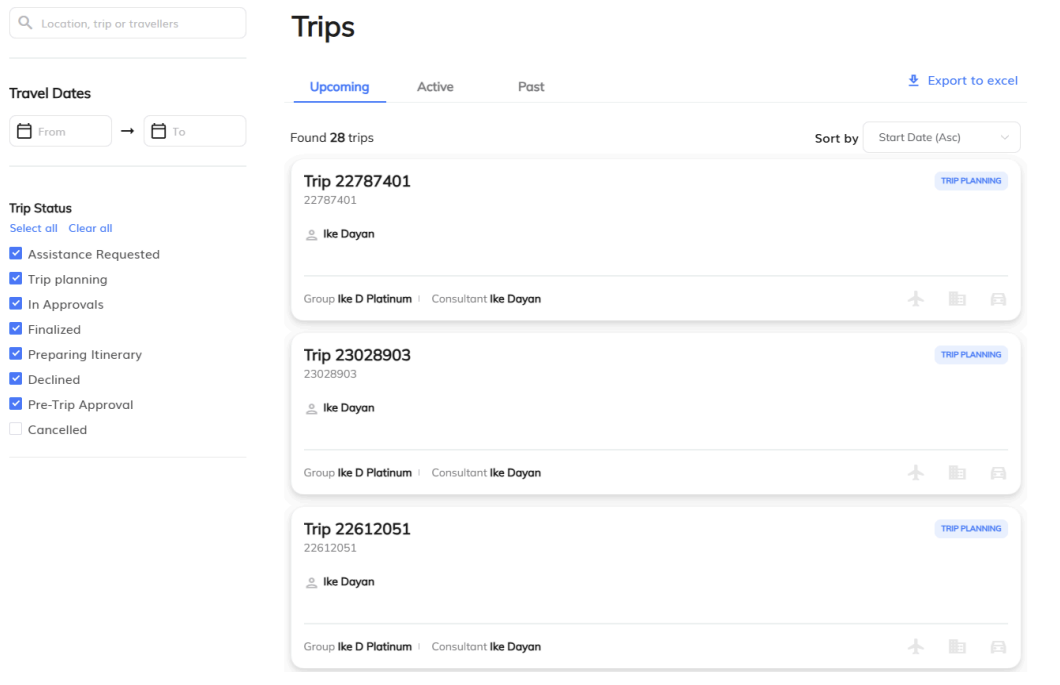
1) Filter by Travel Dates
Use the date range picker to show trips From → To specific dates. This is helpful for month-end reporting or auditing a quarter’s activity.
2) Filter by Trip Status
Select one or more statuses to zero in on trips at a particular stage of the workflow:
Assistance Requested
Trip Planning
In Approvals
Finalized
Preparing Itinerary
Declined
Pre-Trip Approval
Cancelled
Tip: Use Select all / Clear all to quickly include or exclude every status when changing views
filter
status
trip
search
Was this article helpful?
Sorry about that! Care to tell us more?